
ClubGG Sign Up: Complete Step-by-Step Registration Guide
Signing up for ClubGG is simple and straightforward. In this complete ClubGG sign up guide, we’ll walk you through the registration process step by step, from downloading the app to creating your account and getting started.
According to the official ClubGG process, getting started involves three main steps: downloading and installing the application, creating your account, and then joining the game.
ClubGG is currently available on multiple platforms, including iOS, Android, APK, Windows, and Mac, giving players several options for accessing their accounts.
(Chip transfer from GGPoker to ClubGG and vice versa)
Step 1: Download and Install ClubGG
The first step in the ClubGG sign up process is to download and install the version of the ClubGG app that is compatible with your device.
ClubGG is available for iOS, Android, APK, Windows, and Mac, giving you several options to access the platform.
To download ClubGG, visit the official website below and select the appropriate version for your device:
Once the download is complete, install the application on your device. After installation, open the ClubGG app to access the main screen.
Step 2: Create Your ClubGG Account (ClubGG sign up)
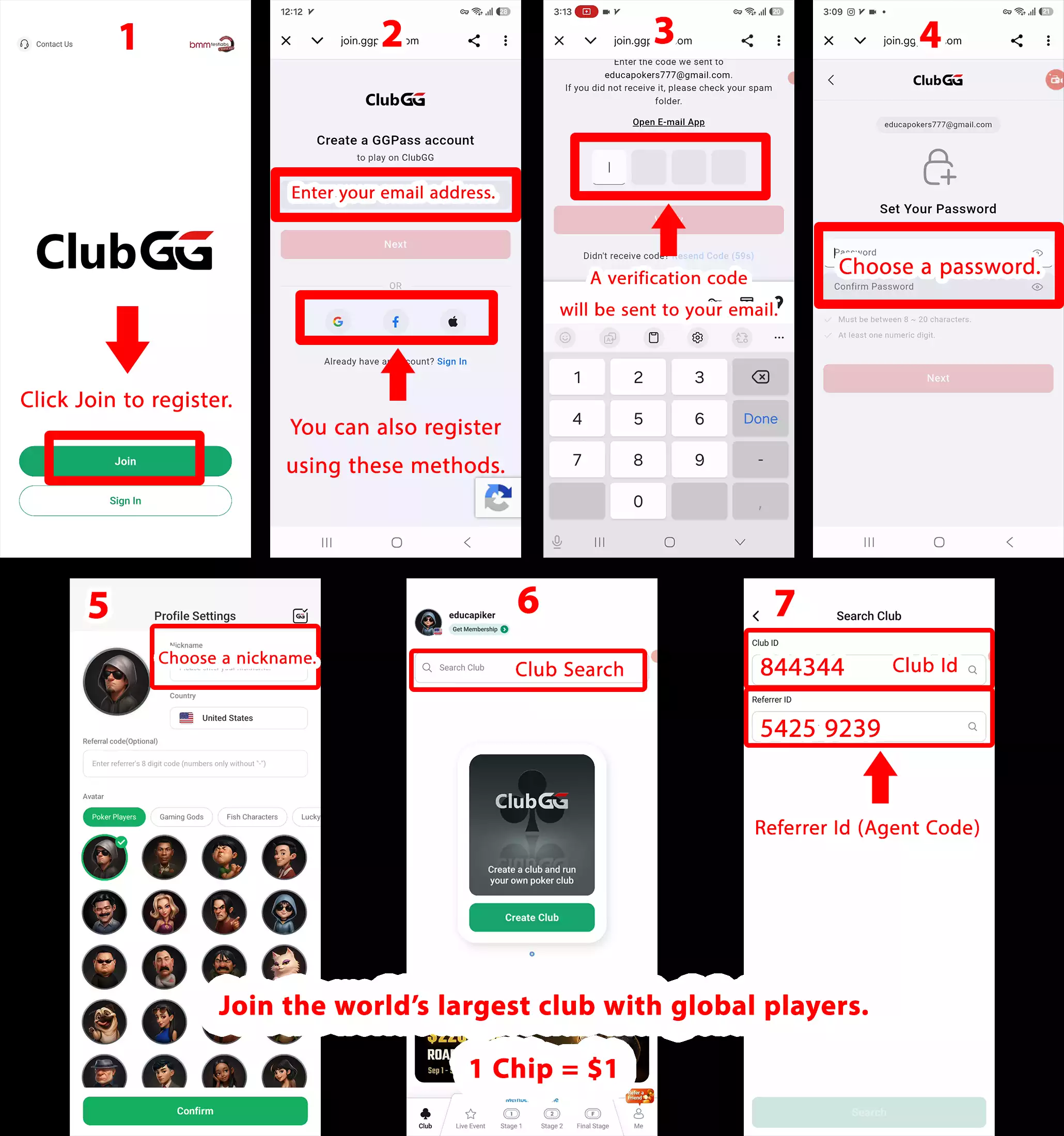
On the main screen of the ClubGG app, select Join to begin creating your account.
You will then be asked to enter the information required to create your account, including a valid email address.
Depending on your device and the version of the ClubGG app you are using, you may have several options for ClubGG Join (sign up) or Sign In, including:
- Email — Join using your email address
- Gmail — Join or sign in using your Google account
- Facebook — Join or sign in using your Facebook account
- Apple — Join or sign in using your Apple ID
Example: Join with Gmail
If you choose the Gmail option, select your Google account and confirm the sign-in. You will then be redirected back to the ClubGG app.
Once you return to ClubGG, your account should be successfully created, and you can continue to the next step of the ClubGG sign up (Join) process.
Step 3: Enter the ClubGG Verification Code and Set a Password
If you sign up (join) for ClubGG using Email, a verification code will be sent to the email address you provided.
Check your email, find the ClubGG verification code, and enter it in the ClubGG app to verify your email address.
Once your email has been verified, you will be asked to create a Password for your account. Choose a secure password that you can remember, as you will need it to sign in to your ClubGG account in the future.
Step 4: Choose Your ClubGG Nickname
After verifying your email, you will need to choose a Nickname for your ClubGG account.
Your nickname will be displayed to other players within ClubGG and while you are playing, so choose a name you are comfortable using as your player identity.
Important: Your ClubGG nickname cannot be changed, so make sure you choose carefully and select a name you would like to be known by on ClubGG.
Once you complete the registration process, you will be automatically logged in to ClubGG. Your ClubGG Account is now ready, and you can access the main app interface.
Step 5: Join a Club on ClubGG
Once you have created your ClubGG account, you can join a Club by using the Search Club option in the app.
Open ClubGG, select Search Club, enter the Club ID, and search for the Club you want to join.
Our ClubGG Details:
Club ID: 844344
Referral ID (Agent Code): 5425 9239
How to Join:
Open ClubGG → Search Club → Enter Club ID → Search → Join
Step 6: Start Playing in the Club
Once you have joined a Club, you can view the available games and tournaments and participate in the games offered by that Club.
ClubGG Sign Up: Registration Steps at a Glance
1. Download ClubGG
↓
2. Install the App
↓
3. Select “Join” to Create an Account
↓
4. Verify Your Email
↓
5. Complete Your Account Setup & Log In
↓
6. Search for a Club by Club ID
↓
7. Join the Club
↓
8. Start Playing